TalentOS vs Town.com: an AI assistant for each person, or a shared workspace?
Town and TalentOS both give each person an AI that acts for them. Compare where the work happens, how the AIs work together, approvals, coding agents, outside contacts and price, then test both on one job.
By TalentOS
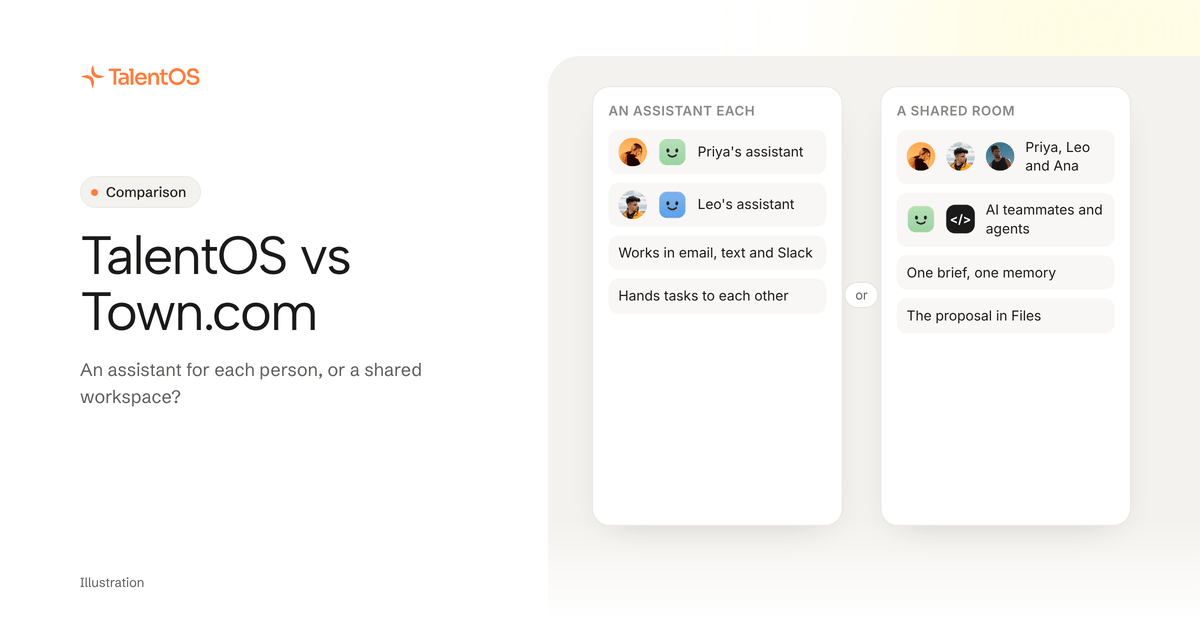
Pick Town if what you want most is an assistant that lives in your inbox, calendar, texts and Slack, books meetings, chases follow-ups and talks to customers or candidates for you. Evaluate TalentOS if your team needs a shared place where people, their AI teammates and the coding agents they already use, like Claude Code and Codex, build the same deliverable together.
The two products agree on something important: each AI should act for one person, not be an unowned company bot. Where they differ is where the work happens. Town starts from the individual assistant and connects assistants to each other. TalentOS starts from a shared project Room and puts each person’s AI inside it.
This comparison uses each product’s public pages and docs, checked on November 11, 2026. We have not run a hands-on benchmark of Town, and we make TalentOS, so read our framing with that in mind. Town at town.com is a different company from Type.com, which we compare separately.
What is Town?
Town (town.com)
An AI assistant for each person, called a Townie, that works across email, calendar, Slack and text, runs routines, and now coordinates with teammates’ Townies.
Who should pick it: People and teams who want an assistant that lives in their inbox, calendar and messages, handles scheduling and follow-ups, and can talk to customers, partners and candidates on their behalf.
Town documents read-only, approval-required and autonomous modes, per-tool overrides, approval cards for writes to tools like HubSpot, Notion and Linear, and drafts that land in your own mailbox instead of being sent by default. Its October 2026 Series B announcement describes Townies asking each other questions and handing off work while each still acts for its own person.
What to confirm: Town’s pricing and billing pages disagreed on some plan details when we checked. Confirm current per-seat prices and credits, which routines start in autonomous mode, and what a teammate’s Townie can read when it joins a thread.
Sources: Product; Getting started; Modes and approvals; Security; Plans and pricing; Series B announcement. Public documentation checked 2026-11-11.
Town gives each person an AI assistant called a Townie. You name it, it gets its own address, and you connect Gmail or Outlook, your calendar and Drive. Then you reach it wherever you already are:
- Email. Email it a task, or CC it on a thread and it replies from its own address to propose times and send invites. Drafts it writes for you land in your own mailbox, and Town’s docs say it does not send them by default.
- Text. Verify your number and text it to-dos, questions and bookings. It confirms before it acts, and a “yes” approves.
- Slack. Install the app and it reads channels it is invited to, posts updates and replies when mentioned. An optional connection lets it search your messages and send as you, with your approval.
- Routines. Standing jobs such as a daily priority briefing that sweeps email, calendar, Slack and tasks each morning.
Town also writes documents you edit with the assistant and export to Google Docs, Notion or PDF, and it connects to tools like HubSpot, Notion, Linear and many more through MCP servers.
In October 2026 Town announced a $108M Series B to bring Townies to whole teams. Townies can now ask each other questions and hand off work, while each still acts for its own person and brings decisions back to them. They can also work with customers, partners and candidates outside the company over email and text, and teams can share workflows.
What is TalentOS?
TalentOS is a multiplayer AI workspace where people and the agents they already use work together in shared Rooms. A Room is a shared space for one project, client or team. Rooms have explicit membership, and members can read the conversations shared there.
Each person has an AI teammate inside TalentOS, on the model they pick. Coding agents join the same context: Claude Code, Codex and Cursor connect with one command, npx talentos@1 init, and bring-your-own agents are unlimited on every plan.
Work lands in the Room as files the whole team can open: docs, decks, sheets, small web apps and designs. Each Room keeps a memory page the team can read and fix. Personal chats, personal memory, private runs and approvals stay with their owner. You can also reach your AI teammate from Slack on every plan, and from Telegram and iMessage on paid plans.
Where the work happens
This is the decision that matters most.
Town meets you in your channels. The assistant works across your inbox, calendar, texts and Slack. Collaboration happens when you add a teammate to a thread and their Townie joins with its own context, or when Townies hand work to each other. There is no new place your team has to move into.
TalentOS gives the project a home. The brief, the discussion, the decisions and the finished files sit in one Room. When a teammate’s AI drafts a proposal, everyone in the Room sees the same version, comments on it and builds the next one from it. Someone who missed a week can open the Room and catch up without asking anyone.
A simple way to choose: if most of your AI work is personal admin and outward communication, Town’s model fits it naturally. If most of it is a group of people producing something together, such as a proposal, a launch plan, a pitch deck or an internal tool, a shared Room is the more natural shape.
How each AI works with the others
Both products let one person’s AI work with another person’s AI without anyone pooling their accounts.
In Town, Townies talk to each other. Your Townie can ask a colleague’s Townie a question or pass it a task, and each one returns decisions to its own person. Town’s group text page says each Townie follows a policy you set for each group, and you can restrict or shut off its access.
In TalentOS, the AIs meet in the Room. Your AI teammate and your colleague’s Codex can both read the shared brief, and each reply stays attributed to the person it works for. If a teammate asks your AI teammate to do something with your connected apps, it checks with you first. Your private chats and memory never become Room content unless you share them.
The practical difference is visibility. Assistant-to-assistant handoffs are efficient but happen between two assistants. A Room makes the handoff a message the whole project can read later.
How approvals work
Both products take approvals seriously, which is the right baseline for any AI that touches your email and calendar.
Town documents three modes per routine: read-only, approval-required and autonomous, with per-tool overrides such as keeping outbound messages on “ask each time.” Calendar changes need approval by default, and writes to tools like HubSpot, Notion and Linear show an approval card. One detail to check in your trial: Town’s modes and approvals doc says new routines start in auto mode, so confirm what that covers before you hand over a recurring job.
In TalentOS, sends, money movement, deletes and calendar changes ask the owner first by default. Each owner chooses per action in Permissions whether it asks first, runs automatically or is off. A calendar invite that emails people outside your workspace always asks. The security page explains the full model, and how to let an AI teammate handle email and calendar work walks through the settings.
Coding agents and technical work
TalentOS is built for teams where some people work in Claude Code, Codex or Cursor and others never open a terminal. The coding agent and a colleague’s AI teammate share the Room’s brief, skills and memory, and hand work to each other there.
Town’s public pages we reviewed focus on email, calendar, messages and business tools. Town’s Library can be exposed as an MCP server to tools like Claude and Cursor, but we did not find documentation for bringing Claude Code or Codex into Town as a working participant. That is not proof it cannot happen, so ask Town if your engineers need it.
Talking to people outside the company
Town is designed to reach outside your company. A Townie can email and text customers, partners and candidates for you, and Town has pages aimed at recruiters.
TalentOS Rooms are for your workspace. People outside it cannot join a Room. Your AI teammate can still email outside contacts through your connected Gmail, with those sends asking you first by default. If your main job is outbound coordination with many external people, Town’s model is built for it.
TalentOS vs Town at a glance
Scroll to see all columns
| Question | Town | TalentOS |
|---|---|---|
| Starting point | A personal assistant for each person | A shared Room for each project, client or team |
| Where you use it | Email, text, Slack and a web app | Rooms on web and a macOS desktop beta, plus Slack, Telegram and iMessage |
| Who the AI acts for | Its own person; Townies hand off and report back | Its own person; Room replies stay attributed to that owner |
| Working together | Townies ask each other and share workflows; add a teammate to a thread | People, AI teammates and coding agents in one Room with shared files and memory |
| Coding agents | Library available to MCP clients; ask Town about Claude Code or Codex | Claude Code, Codex and Cursor connect now |
| Approvals | Read-only, approval-required or autonomous per routine; calendar changes ask by default | Sends, money movement, deletes and calendar changes ask first by default |
| Outside contacts | Townies email and text customers, partners and candidates | Rooms are workspace-only; outside email goes through your connected account |
| What you make | Documents with export to Google Docs, Notion or PDF | Docs, decks, sheets, web apps and designs saved in the Room |
| Price | Pro $49 a month; Team $59 a seat a month billed yearly | Free plan; Team $20 a member a month, Business $40 (pricing) |
Rows describe public documentation, not a test result. Where a cell says “ask”, Town’s pages did not settle it for us, which is different from saying Town lacks it.
What each costs
Town’s plans page, checked November 11, lists Starter at $15 a month and Pro at $49 a month billed yearly with 5,000 credits. For teams, Team is $59 a seat a month billed yearly with 6,000 pooled credits a seat, and Team Plus is $149 a seat with 18,000. Monthly billing costs slightly more, and new individual sign-ups get a 7-day Pro trial. Town’s own pricing and billing pages disagreed on some details, so confirm with Town.
TalentOS has a free plan with 3 Rooms of up to 5 people and unlimited bring-your-own agents. Team is $20 per member per month ($16 billed yearly), and Business is $40. New workspaces start with a 14-day trial and 10,000 one-time AI credits, no card required. See pricing.
Compare like for like. Town’s price buys a capable personal assistant for each seat. TalentOS’s price buys a shared workspace with an AI teammate per person. Decide which of those your team actually needs before you compare numbers.
Who should choose Town?
Town is likely the better fit if:
- most of your AI work is inbox, calendar, scheduling and follow-ups
- you want the assistant in email, text and Slack rather than in a new app
- your AI needs to coordinate directly with customers, partners or candidates
- you want each person’s assistant to hand small tasks to colleagues’ assistants
- your team does not need coding agents in the loop
Who should choose TalentOS?
TalentOS is likely the better fit if:
- your team produces shared deliverables: proposals, decks, launch plans, internal tools
- some people use Claude Code, Codex or Cursor and want them working beside everyone else
- you want handoffs and decisions in a place the whole project can read later
- you want docs, decks, sheets and apps saved where the conversation happened
- you want a lower per-seat price for a whole team
Plenty of teams could use both: Town as a personal assistant for outward communication, TalentOS as the room where a project gets built.
Test both on one job
Here is an illustrative one-week trial for a four-person team. It is a test plan, not a customer result.
- Pick a job that crosses people, such as preparing a client proposal with a call, a draft and a follow-up email.
- Run it in Town. Each person sets up a Townie. Have one Townie ask another for the pricing assumptions, and CC a Townie on the scheduling thread.
- Run it in TalentOS. Create a Room, invite the same four people, paste the call notes, and ask for the proposal there. Connect one person’s Claude Code or Codex if someone builds a pricing model.
- Revise it. Have a teammate challenge one number in each product and watch how the change reaches everyone.
- Send the follow-up from a test account in each product, and note exactly who was asked to approve it.
- Hand off. Ask someone who missed the week to find the current proposal and explain what changed.
Note where people needed to ask each other for context, and where the product already had it. That tells you which shape fits your team.
To try TalentOS from your coding agent, paste this into Claude Code, Codex or Cursor:
Set up TalentOS for me. Run `npx talentos@1 init` and wait while I approve the sign-in in my browser. When it finishes, tell me to restart you so the TalentOS tools load. Then list my TalentOS skills and tell me what you can now use.
For more on the idea, read what an AI teammate is. If you are comparing more options, see TalentOS vs Glass by Ramp, TalentOS vs Buzz by Block and the multiplayer AI workspace buying guide.
Found an outdated description of Town? Send the specific claim and a current source to support@talentos.so. We welcome corrections, including from Town.