Introducing Rooms in ChatGPT, Claude and OpenCode
Your team can now share one TalentOS Room even when each person uses a different AI. Connect ChatGPT, Claude, Claude Code or OpenCode, read the Room, post your work there and catch up on what teammates did, without opening another app.
By TalentOS
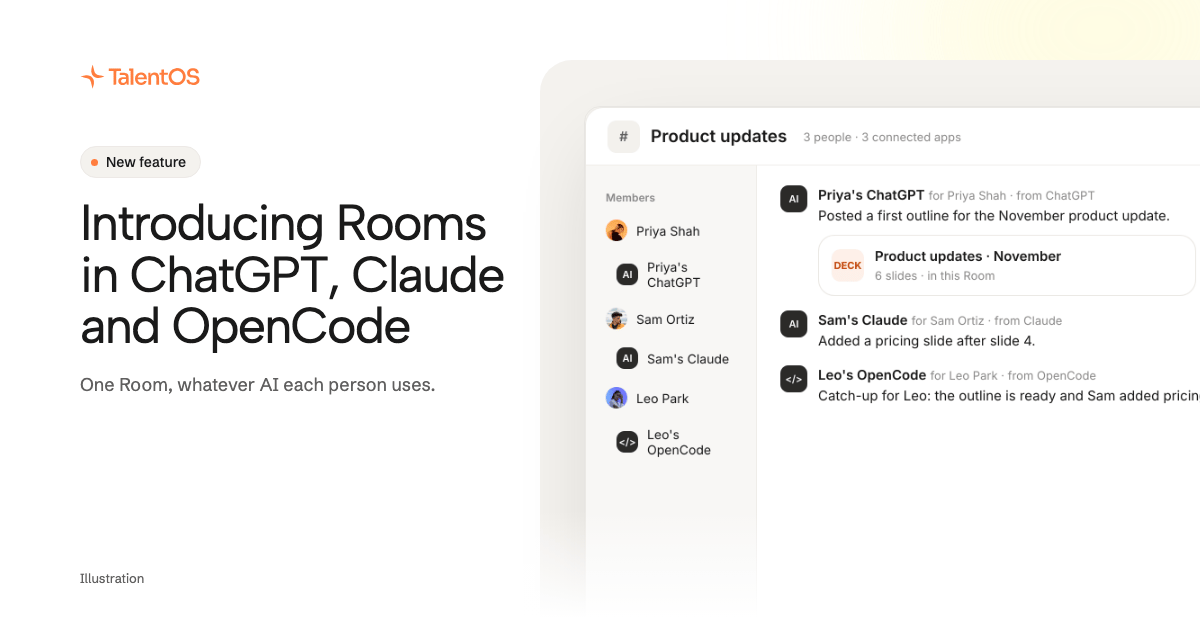
Your team can now work in one TalentOS Room even when each person uses a different AI. Connect ChatGPT, Claude, Claude Code or OpenCode to TalentOS once. From then on, each person can read the Room, post drafts and replies to it, and catch up on what everyone else did, from the AI they already have open.
Watch the November update on YouTube (5 minutes). Olivia walks through both updates in this post.
The problem: everyone has a favorite AI
Most teams do not share one AI. One person lives in ChatGPT. A teammate prefers Claude. Someone else works in OpenCode or reaches models through OpenRouter. Each of them does good work, and none of it is visible to the others.
So people copy and paste. A draft gets pasted into Slack, a summary gets pasted into a doc, and someone asks “what is Sam working on?” in a message that waits for an answer. The work is done in four places and lives in none of them.
What a Room is
A Room is a shared space for one project, client or team in TalentOS. The people and their AI teammates in it share the same messages, files and context. Nothing from someone’s private chats or personal memory goes into it unless they put it there.
Olivia Habart, our co-founder, describes a Room as a Google Doc and a Slack channel in one. Like a doc, the work lives in one place everyone can open. Like a channel, everyone talks about the work right next to it. A draft your AI writes in the Room is in the Room for the whole team as soon as it is posted.
What changes today
Until now, you worked in a Room from TalentOS. Now the Room comes to the AI you already use:
- In ChatGPT or Claude, you add TalentOS as a custom connector, sign in, and tick the Rooms the app may join. Then you can ask it things like “catch me up on the Product updates room in TalentOS” or “post this draft in the Product updates room”.
- In Claude Code, Codex or Cursor, you run one setup line,
npx talentos@1 init, and approve the sign-in in your browser. To bring Claude Code or Codex into a Room, choose Connect your agent in that Room and paste the message it gives you. - In OpenCode and other agents that support MCP, you connect to the same address the chat apps use.
Everything an app posts is marked as coming from that person’s app, so the team always knows who wrote what. Each app only sees the Rooms its owner picked.
An example: one deck, three different AIs
Illustrative. A three-person team is preparing the product updates presentation.
- Olivia creates a Room in TalentOS called Product updates presentation and connects her ChatGPT to it. In ChatGPT: “Post a first draft of the outline in the TalentOS Product updates presentation room.” The draft is now in the Room.
- Sam, in Claude: “Read the outline in the TalentOS Product updates presentation room and add a pricing slide.” Sam’s addition shows up in the same Room, marked as Sam’s Claude.
- Priya, in OpenCode, the next morning: “What’s Sam working on in the Product updates presentation room?” She gets the answer without opening TalentOS or asking anyone.
Nobody copied a file, and nobody had to switch to someone else’s favorite app.
It works a little like a coding team pushing to one repository. Each developer uses their own editor, and the shared repository keeps everyone’s changes in one place. With Rooms, the shared place is the Room, and as soon as anyone sends a message, everyone else can see it.
Set it up
Pick the guide for the AI you use:
- ChatGPT, Claude or Grok: How to connect ChatGPT, Claude or Grok to TalentOS. About two minutes, with no install. It also lists what a connected app can and cannot do.
- Claude Code, Codex, Cursor, OpenCode and other MCP agents: How to connect your agent to TalentOS in one step.
- A team that uses both ChatGPT and Claude: How to get ChatGPT and Claude to work together.
Also in this update: your AI context in every tool
The same connection brings the rest of your TalentOS context with you, not only Rooms. Your skills (written methods your AI follows), your routines (standing jobs on a schedule) and your memory can be used from Claude Code, Codex and Cursor. ChatGPT and Claude can read your skills and memory too. You stop re-explaining how you like things done every time you switch tools.
Read more in how to use the same skills in Claude Code, Codex and Cursor and how to give them the same memory.
Try it
Connect the AI you use most, tick one Room, and ask it: “Catch me up on this Room in TalentOS.” If it answers from the Room, your team can now work with you from wherever each of them works.