TalentOS vs Obsidian: a vault for you, or shared context for your team's agents?
Obsidian is a great home for one person's notes and agent files. TalentOS is built for a team whose people and agents share skills and memory. How each handles sharing, permissions and agent access, and how to choose.
By TalentOS
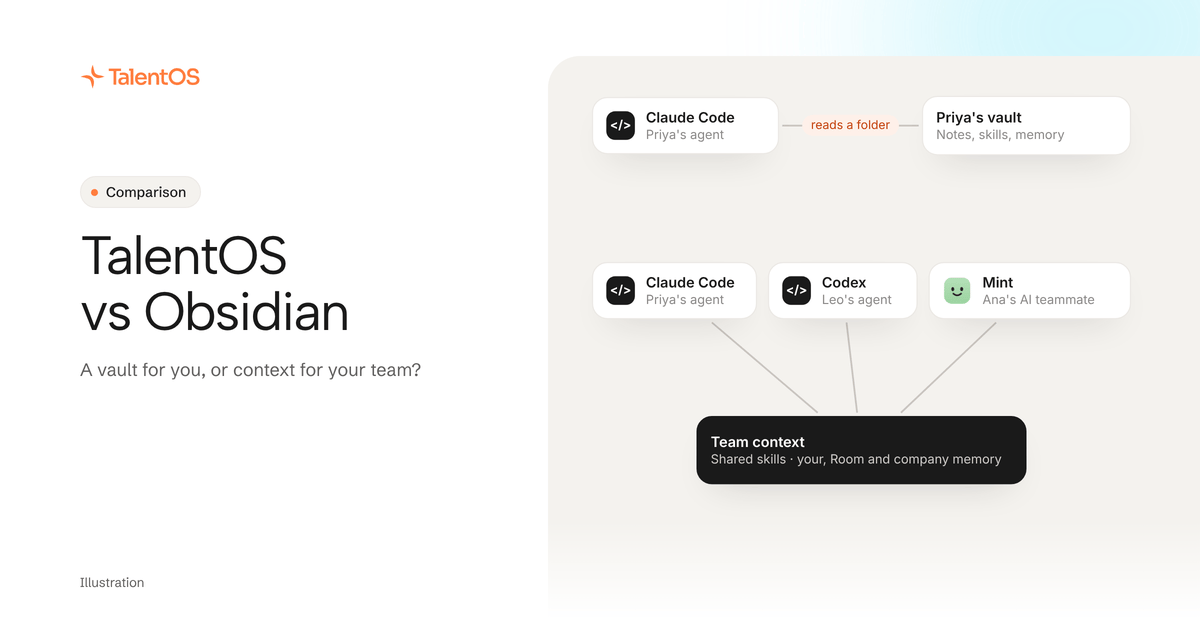
Keep Obsidian when the context is yours: your notes, your drafts and the skill files your own Claude Code reads from a folder on your computer. Evaluate TalentOS when several people and their agents need the same skills and memory, with different audiences for what is personal, what belongs to a project and what the whole company relies on.
Plenty of people who live in Claude Code, Codex or Cursor already use an Obsidian vault as their agent’s memory. It works well for one person. This comparison covers what changes when a second person, and their agents, need the same context. It is based on Obsidian’s own help pages and pricing, checked on November 12, 2026, not a hands-on benchmark.
Why AI power users like Obsidian
An Obsidian vault is a folder of Markdown files on your computer. That is the most agent-friendly format there is. Point Claude Code at the folder and it can read your notes, your project briefs and your skill files with no setup at all.
Obsidian has also moved toward agents. Its command line interface controls the desktop app from a terminal and needs the app running. Obsidian Headless, in open beta, syncs a vault without the desktop app. Obsidian lists giving “agentic tools access to a vault without access to your full computer” as one reason to use it.
The app is free, your files stay yours, and the community plugins cover a lot. If you work alone, a vault plus a coding agent is a strong setup, and you may not need anything else.
What changes when a team shares the vault
Teams share a vault through Obsidian Sync. Obsidian’s shared vault guide sets out the terms:
- Everyone pays for Sync. All collaborators need an active Sync subscription. Sync costs $4 per user per month billed yearly, or $5 billed monthly.
- Everyone gets the same rights. “Fine-grained permissions are not supported yet.” All collaborators receive the same permissions as the vault owner, except that only the owner can invite people.
- No live editing. You do not see a teammate’s cursor. Edits appear once they sync, and simultaneous edits to one file are merged.
- Up to 20 people. A shared vault holds at most 20 collaborators.
None of that is a problem for a shared folder of notes. It matters more once agents write to the vault. When the vault is your agents’ memory, any connected agent can change any note, including the client facts and skills a teammate’s agent reads next. There is no step where a person reviews a change before it reaches everyone, and no separate place for what should stay personal. That is our reading of the documented model, not a test.
How TalentOS handles the same jobs
TalentOS is a shared AI workspace. People bring the agents they already use, like Claude Code, Codex and Cursor, and each person also has an AI teammate inside TalentOS. Skills, memory and connected apps live in one place that every agent reaches through the same connection.
- Skills. A skill is a reusable method: the steps, the inputs and what good output looks like. You save one from your agent and it starts private to you. A person shares it with one Room or with the whole company. Running
npx talentos@1 initsaves the team’s skills into the folders Claude Code, Codex and Cursor already read. - Memory with audiences. Your memory is visible only to you, even from admins. Room memory belongs to one project or client and its members can read and correct it. Company memory is for facts everyone should use, and a fact from a member is reviewed before everyone’s agents can use it.
- Work that needs your apps. In a Room, when you ask, your agent can read your connected apps like Gmail or HubSpot through TalentOS. Anything that sends a message, moves money or deletes something asks you first by default.
- Shared results. Documents, decks, spreadsheets and small web apps made in a Room are shared with that Room.
Side by side
Scroll to see all columns
| What the job needs | An Obsidian shared vault | TalentOS |
|---|---|---|
| Where the context lives | Markdown files, synced to each collaborator’s device | A hosted workspace your agents reach over one connection |
| Who can change shared context | Every collaborator, with the owner’s permissions | Personal stays yours. Company facts are reviewed first |
| Separate personal and team notes | Use separate vaults | Your memory, Room memory and company memory |
| How agents read it | From the files on disk, the CLI, or Headless (open beta) | One setup line for Claude Code, Codex and Cursor |
| Sharing a skill | Copy the file into the shared vault | Save it from your agent, then share it with a Room or company |
| Using connected apps | Through plugins or tools you add | In a Room, on your ask, with approval before anything goes out |
| Price | App free. Sync $4 to $5 per user per month | See TalentOS plans |
Can you use both?
Yes, and many people should. Keep Obsidian for your own thinking: journals, research, drafts and anything only you need. Put the things your team’s agents depend on, such as shared skills, client facts and project decisions, where every teammate’s agent can reach them with the right audience.
There is no sync between the two. Decide which copy is the real one for each thing you move, and leave a note in the old place pointing to the new one. Our guide to moving AI skills and memory out of Notion or Obsidian walks through it.
Start with one line
Pick the skill file in your vault your agent uses most, and three facts a teammate keeps asking you about. Then paste this into Claude Code, Codex or Cursor:
Set up TalentOS for me. Run `npx talentos@1 init` and wait while I approve the sign-in in my browser. When it finishes, tell me to restart you so the TalentOS tools load. Then save my most-used skill from my Obsidian vault to TalentOS as a private skill.
After the restart, tell it the three facts and ask it to remember them. Share the skill with a teammate and ask them to run it from their own agent. If they get the same result without asking you anything, you have your answer.
See how the pieces fit on the company brain page, or compare a file-based approach in TalentOS vs HQ.
Written by TalentOS using Obsidian’s help pages and pricing page, checked November 12, 2026, and our own product. This is a fit comparison, not a hands-on benchmark or a claim of complete feature parity.