What is portable context for AI agents?
Portable context is everything your AI needs to know about your company, kept in one place you own and usable from any agent you connect. It is more than memory. Here is what goes in it and how to set it up.
By TalentOS
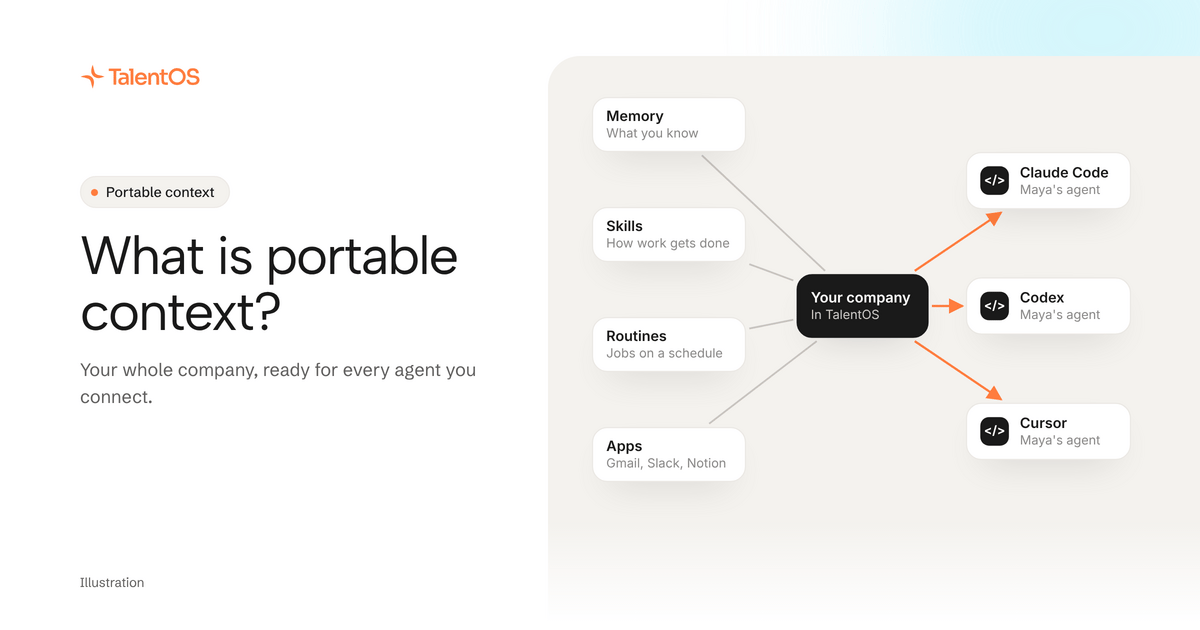
Portable context is everything your AI needs to know about your company, kept in one place you own, so any agent you connect can start from it. It is more than memory. It is what your company knows, how it likes work done, the jobs that run every week, the apps it uses and the people involved. In short: own your context, and give every agent the same starting point.
Most people meet the problem before they have a name for it. You explain a client to Claude Code on Monday. On Wednesday you open Codex and explain the same client again. On Friday you try a new AI app and start from zero a third time. Each AI is capable. None of them knows your company.
Why memory alone is not enough
The first fix most people reach for is memory: a place where an agent can save a fact and find it later. That helps. “Northwind wants monthly invoices” is worth remembering.
But think about what a new colleague needs on their first day. They need the facts, yes. They also need to know how the team writes a client update, which reports go out every Monday, which tools to use and who to ask. A colleague who only had the facts would still get most of the job wrong.
Your AI is the same. It needs five things, not one:
Scroll to see all columns
| Piece of context | What it holds | Example |
|---|---|---|
| Memory | What you and your team know | Northwind’s renewal is March 1 |
| Skills | How you like a job done | How we write a weekly client update |
| Routines | Jobs that run on a schedule | The Monday client digest at 8:30 AM |
| Connected apps | The tools the work happens in | Gmail, Slack, Notion, HubSpot |
| Your team | The people and agents working on the same job | A Room with Maya, Leo and their agents |
Portable means all five travel with you. You can switch from Claude Code to Codex, or change the model behind your assistant, and nothing has to be explained again.
Where portable context usually lives today
For most people, it lives in five scattered places:
- Memory inside each AI app, separately, so Claude knows one thing and ChatGPT another.
- Skills as prompts in a notes file, or a folder in one project.
- Routines in an automation tool, disconnected from the AI.
- App access granted again to every new tool.
- Team context in chat threads nobody’s AI can read.
Every time you change tools, you leave some of it behind. That is the real cost of trying a new agent: not the subscription, the re-explaining.
How TalentOS keeps it in one place
TalentOS is a shared AI workspace. It holds your memory, skills, routines and connected apps next to the people you work with, and the agents you already use connect to it.
Today that means:
- Claude Code, Codex and Cursor connect with one setup line. Your agent can then search your memory, save new facts, follow your team’s skills, save a new skill for you, and start one of your routines when you ask.
- Your skills are plain files you can download and take anywhere. Setup saves your team’s skills into your project, in the folders those three agents already read.
- Your connected apps stay behind TalentOS. When Claude Code or Codex works in a Room for you, it reads Gmail or HubSpot through TalentOS, and anything that sends a message, moves money or deletes something asks you first. The agent never sees your password or token.
- Your AI teammate inside TalentOS uses the same memory and skills, on the model you pick: Claude, Gemini, DeepSeek, Kimi or GLM.
- Your team works in Rooms: shared spaces for a project or client where people and their agents pick up each other’s work.
One honest limit: you cannot import a memory export from another AI app yet. Ask your agent to save the facts that matter instead. The ChatGPT, Claude and Grok apps connect too, at https://mcp.talentos.so/mcp, and work in the Rooms you choose.
What stays private
Portable does not mean public. In TalentOS, your personal memory belongs to you, even from admins. A teammate’s agent cannot read it. Room memory is shared with that Room’s members, and company memory with the workspace. A fact your agent adds to company memory is reviewed before everyone gets it.
A quick test for your own setup
Ask yourself four questions:
- If you switched to a different AI tomorrow, what would you have to explain again?
- Where do your best prompts live, and could a colleague use them?
- How many tools have you connected your email to this year?
- Could your teammate’s agent pick up your work without a call?
If the answers are “a lot,” “my notes,” “too many” and “no,” your context is not portable yet.
Try it
Paste this into Claude Code, Codex or Cursor:
Set up TalentOS for me. Run `npx talentos@1 init` and wait while I approve the sign-in in my browser. When it finishes, tell me to restart you so the TalentOS tools load. Then list my TalentOS skills and tell me what you can now use.
The step-by-step setup guide explains each step. For why this matters, read own your context, and see the whole idea on one page at own your context for AI agents.