How to find the AI skills your team already trusts
Use your team's own ratings, Adds and comments to pick an AI skill or routine that already works, instead of starting from a blank prompt. Here is how to read a listing and leave feedback that helps.
By TalentOS
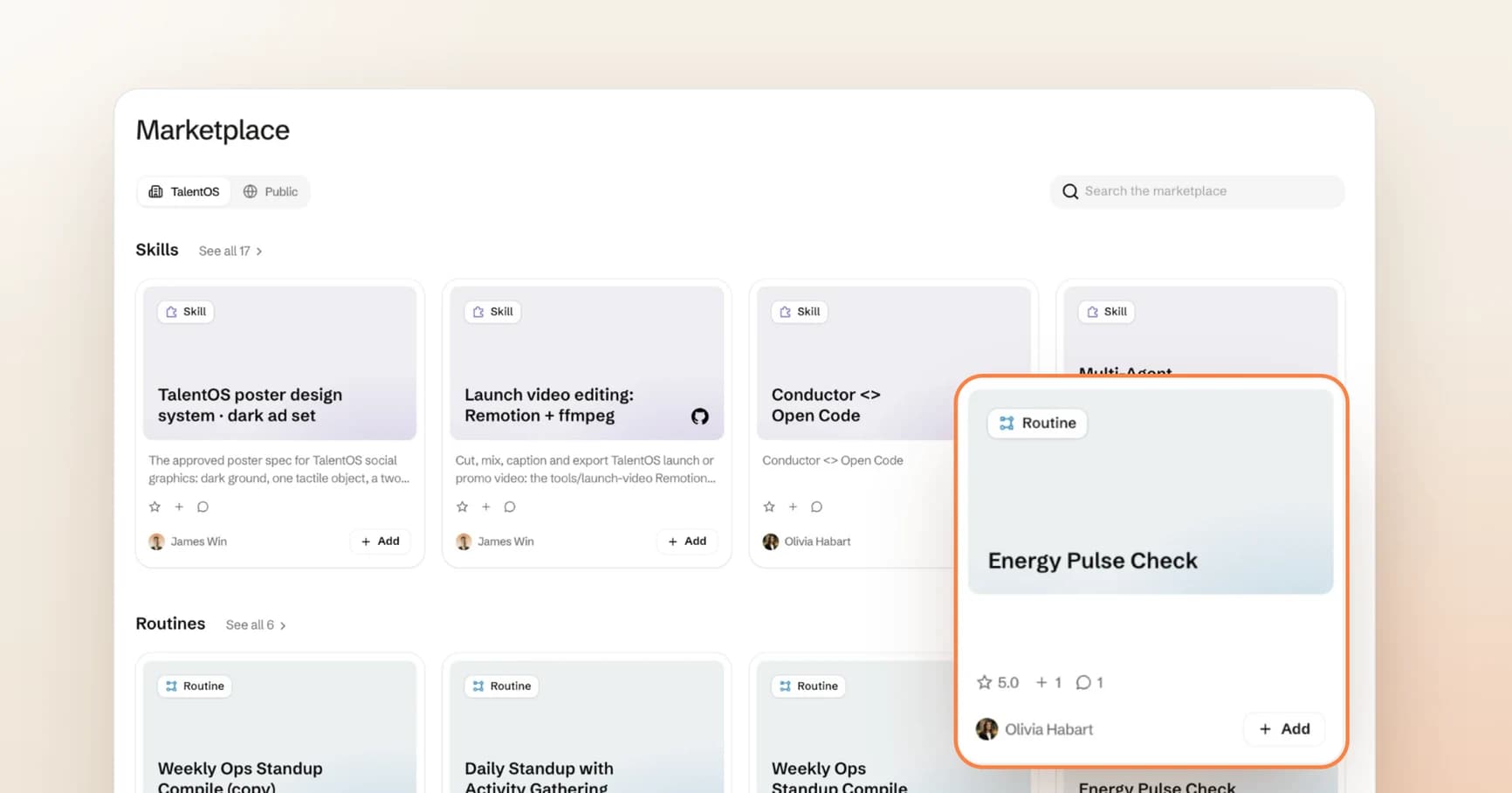
To find an AI skill your team already trusts, look at what your coworkers did with it, not only what its title promises. In the TalentOS Marketplace, every skill and routine a teammate shares carries three signals from the people who used it: a rating from 1 to 5, the number of times someone added it to their own library, and the comments they left. Read those three together, check who built it, and you can start from a method that has already worked on real work at your company.
That matters because most AI work begins with a blank prompt. Someone on your team has probably already solved the job you are about to start. The hard part was never writing the method. It was knowing which of the twenty saved prompts in your company is the good one.
What the Marketplace is
The Marketplace is the place in TalentOS where a company’s shared AI methods live. Two kinds of item matter most here.
A skill is a reusable method an agent can follow. It explains when to use it, which inputs it needs, what it should produce, and how to check the result. “Cut and caption a launch video from these clips” is a skill.
A routine is a standing assignment with a schedule and an owner. “Compile the weekly ops standup every Monday” is a routine.
The Marketplace has two sources, shown as tabs at the top of the page:
- Your company’s tab, named after your workspace, lists the skills and routines your teammates published to the whole company. Each card shows the teammate who built it.
- Public lists skills from outside your company: ones TalentOS curated and ones pulled from public GitHub repositories, credited to that repository.
Your coworkers’ names only appear on your company’s tab. Public listings credit a repository or TalentOS, never a member of your team.
How to read a listing in thirty seconds
Every card shows the same short row of signals. Here is what each one tells you, and what it does not.
Scroll to see all columns
| Signal | What it means | What to check |
|---|---|---|
| Star rating | The average of ratings from 1 to 5 left by teammates | How many people rated it. A 5.0 from one person is one opinion. |
| Adds | How many people added it to their own library | Many Adds with a low rating usually means a useful job done badly. |
| Comments | Notes and suggested changes from people who used it | Whether recent comments report a problem the author has not fixed. |
| Author | The teammate who built it | Whether they still own that kind of work and can answer questions. |
Read them in that order. The rating tells you whether people were happy. The Adds tell you whether people came back for it. The comments tell you why. The author tells you who to ask.
A quick example from our own workspace: in the cover image above, the Energy Pulse Check routine shows 5.0, one Add and one comment. That is a promising start, not a verdict. One person rated it and one person added it. Read the comment before you rely on it, and expect the numbers to mean more once a few more people have used it.
Sort by the question you are asking
Your company’s tab can sort by most recent, most added, top rated, and popular. Each sort answers a different question:
- Most added answers “what do people actually reach for?” Start here when you are new to a team.
- Top rated answers “what do people like most?” Check the number of ratings behind each score.
- Recent answers “what changed this week?” Use it to catch a teammate’s new method early and be one of its first reviewers.
- Popular blends those signals into one ordering when you just want a good starting shelf.
If two listings look like they solve the same job, open both. The comments usually explain the difference faster than the descriptions do.
Why ratings belong to a version
A shared skill points at a saved version of the method. Ratings, Adds and comments are recorded against the version people actually used.
That keeps the numbers honest. If an author rewrites a method, a 5.0 earned by the old version does not quietly transfer to the new one. If a listing changes while you have it open, TalentOS asks you to reopen it before you rate or comment, so your feedback lands on the version you read.
It also means adding a skill gives you your own copy of that version. The author can keep improving their method without silently rewriting the copy already running in your work.
How to leave a rating that helps the next person
A rating is a short review your coworkers will read before they trust a method with their work. A few rules keep it useful:
- Rate after you have used it on real input. Opening a listing is not a test.
- You cannot rate your own work. TalentOS blocks authors from rating their own listings, so the score reflects other people’s experience.
- Change your rating when your view changes. Each person has one rating per version, and rating again replaces your earlier score.
- Put the reason in a comment. A number says how you felt. A comment says what happened.
Comments come in two kinds: a normal comment, and a suggested change for the author. A suggested change is the most useful feedback you can give, because the author can act on it. Use this shape:
What I ran it on: A two week client update with three open risks.
What worked: The summary and the decisions section needed no edits.
What I had to fix: It listed a milestone as done that was still in review.
Suggested change: Ask for the status of each milestone as an input instead of inferring it.
That example is illustrative. Keep client names, private notes and account details out of Marketplace comments, since every member who can see the listing can read them. A comment can be removed by the person who wrote it or by a workspace owner.
What a high rating does not tell you
A good score means coworkers were happy with their results on their inputs. It does not prove the method will be right for yours. Run a new skill on one real input before you hand it a deadline, and test a skill before you share one of your own.
Adding a skill also does not hand you anyone else’s access. A skill is a set of instructions. It does not share the author’s private chats, personal memory, or connected tools, and actions that write to other systems still ask the person running the work for approval where your settings require it. Money movement, irreversible actions and calendar writes always ask. The security page explains the full approval model.
If you build skills, read your listing like a stranger would
The same signals that help a reader pick a method tell an author what to fix next. Low Adds usually mean the title or description does not name the job clearly. Plenty of Adds with a middling rating usually means the job is right and the output needs work. A suggested change is a free test case.
When you publish an improvement, say what changed in the description. The new version starts its own record, and a clear note gives people a reason to try it.
For the wider work of choosing which methods your company should share at all, read how to build a company AI skills library people actually use. For a first skill, start with turning one useful prompt into a team skill, or browse the public skill library for ideas.
Start with one job this week
Pick a task you will do in the next few days. Open the Marketplace, search for it, and sort by most added. Open the top two listings and read their comments. Add the better one, run it on real input, and leave a rating and one sentence about what happened. The next person on your team who needs the same job will start from your answer instead of a blank prompt.